
The Revenue report shows how much you raised in your dates, how it was paid, and where it came from: payment methods, location, devices, time of day and campaign links. Its totals use the same rules as the Summary report, so Total raised matches for the same filters.
Before you start
-
You need Admin access with permission to view reports.
How to open the Revenue report
-
Go to your CrowdChange site and Log In.
-
Click your name in the top-right corner, then click Admin.
-
In the menu on the left, click Reports, then Revenue.
-
Set your dates and any filters. See How to filter, compare and download reports.
Include matching gifts
Matching gifts are left out by default. Turn on Include matches to add them to Total raised and every amount built on it. The Matching gifts column in Revenue summary then shows them.
Cards
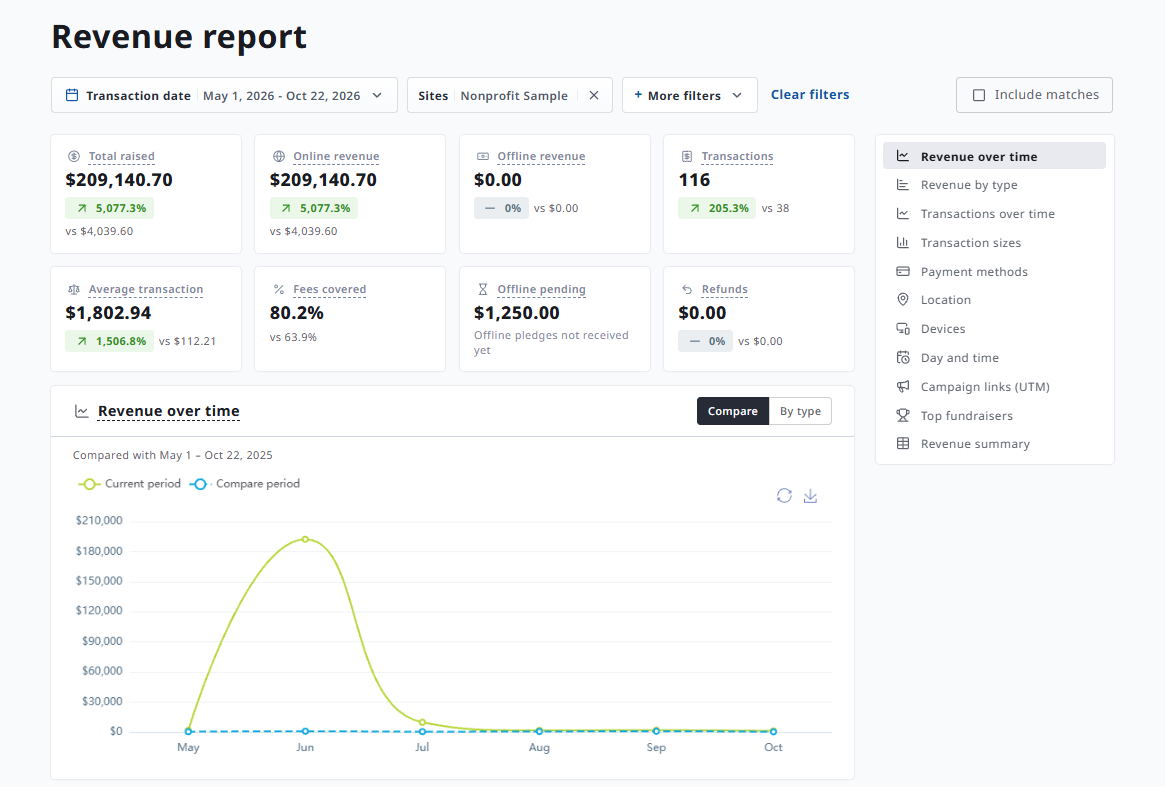
|
Card |
What it shows |
|---|---|
|
Total raised |
Total amount received, minus refunds. Does not include matching gifts (unless Include matches is on) or pending offline transactions. |
|
Online revenue |
Amount received from online payments, minus refunds. |
|
Offline revenue |
Offline transactions marked as received, minus refunds, plus online payments of offline pledges. |
|
Transactions |
Number of transactions, including free ones. Does not include fully refunded or pending offline transactions. |
|
Average transaction |
Average amount per transaction. Free transactions are not included. |
|
Fees covered |
Share of online transactions where the constituent chose to cover the fees. |
|
Offline pending |
Offline transactions not marked as received yet. They're added to Total raised once received. No compare value. |
|
Refunds |
Amount refunded in your dates, including partial refunds. Already subtracted from Total raised, so Total raised + Refunds is everything received. |
Charts and tables
|
Section |
What it shows |
|---|---|
|
Revenue over time |
Amount received over time, minus refunds. Compare overlays the compare period; By type stacks the revenue types. |
|
Revenue by type |
What the money was for, minus refunds. Same rows as the Summary report, except team packages and bundles share one row and Matching gifts has its own row. |
|
Transactions over time |
Number of transactions over time, including free ones. Online and offline splits them. |
|
Transaction sizes |
Number of transactions in each amount range (under $100, $100–250, $250–1,000, $1,000–5,000, $5,000+), including free ones. |
|
Payment methods |
How constituents paid (card brands, wallets, bank payments, crypto, donor-advised funds, offline, installment plan), by number of transactions. Free transactions are not included. |
|
Location |
Transactions and amounts by billing country, and by province or state. |
|
Devices |
The device constituents used at checkout. Scheduled payments, offline entries, card reader and API transactions have no device. |
|
Day and time |
When constituents checked out online, by weekday and hour, in your site's time zone. Offline entries and automatic scheduled payments are not included. |
|
Campaign links (UTM) |
Online checkouts by UTM source, medium and campaign. See Donation Widget Links & UTM Tracking. |
|
Top fundraisers |
Fundraisers by Total raised in your dates, with transactions and online/offline split. Goal progress uses each fundraiser's all-time raised amount. Has its own Download and Edit columns. |
|
Revenue summary |
Total raised and each revenue type per week (for ranges up to 30 days) or per month. Has its own Download and Edit columns. |
Download the Revenue report
-
Set your dates and filters.
-
Click Download above Top fundraisers or Revenue summary.
-
Open the link in the email we send you.
Tips & troubleshooting
-
Location, Devices, Day and time and Campaign links don't add up to Total raised. They use the amount originally charged (later partial refunds aren't deducted), and some leave out offline and scheduled payments.
-
"Online" means two slightly different things. In the cards, online revenue excludes online payments of offline pledges (they count as offline revenue). In Day and time and Campaign links, any online checkout counts.
-
See Why don't my report numbers match? for other differences.