
The Constituents report shows who gives, who is new and who comes back. A constituent is anyone who made a transaction to your fundraisers, including a free one: a donation, ticket, registration or other purchase.
Before you start
-
You need Admin access with permission to view the Constituents report.
How to open the Constituents report
-
Go to your CrowdChange site and Log In.
-
Click your name in the top-right corner, then click Admin.
-
In the menu on the left, click Reports, then Constituents.
-
Set your dates and any filters. See How to filter, compare and download reports.
Under + More filters, Constituent created keeps only people who became constituents of your organization in the dates you choose.
Cards
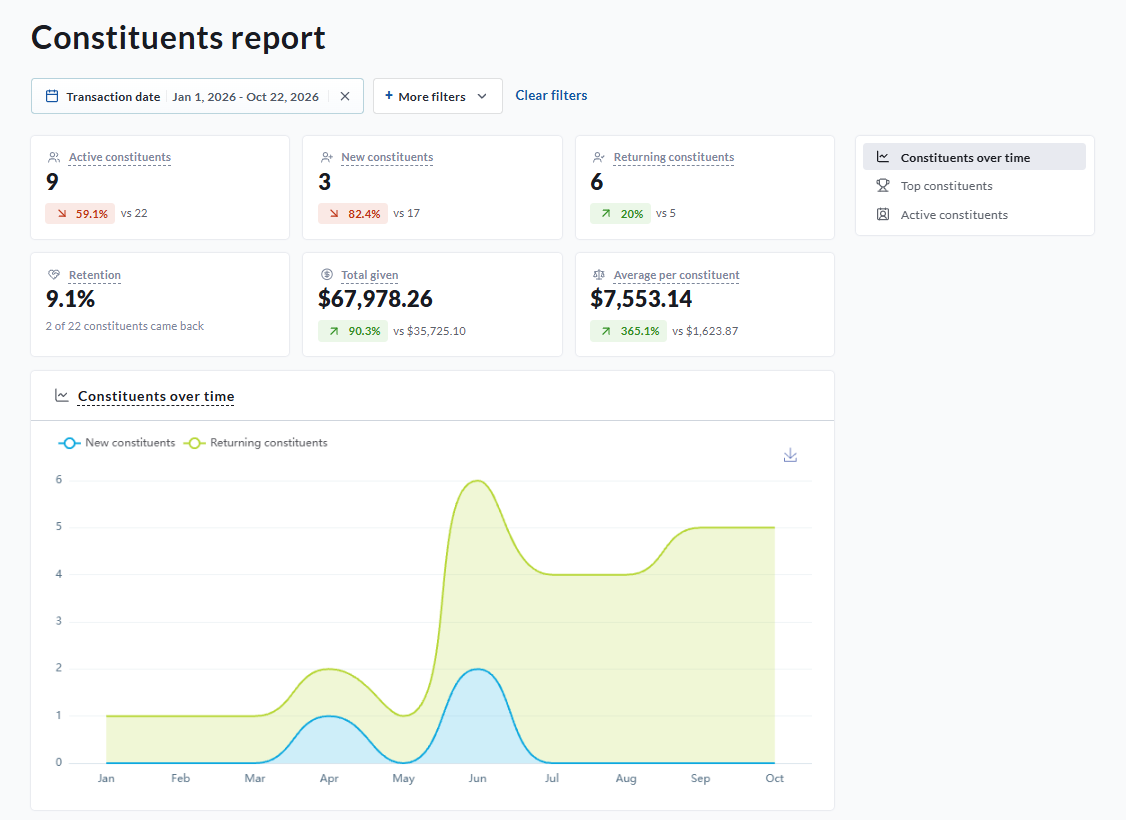
|
Card |
What it shows |
|---|---|
|
Active constituents |
People with at least one transaction in your dates. Each person counts once. Offline gifts without an email are not counted. |
|
New constituents |
People who made their first transaction to your fundraisers in your dates. |
|
Returning constituents |
People who had made a transaction before your dates, whatever campaign or team brought them back. |
|
Retention |
Share of the compare period's constituents who came back in your dates (for example 5 of 6 constituents came back). |
|
Total given |
Total amount these constituents gave in your dates, minus refunds. |
|
Average per constituent |
Total given divided by active constituents. |
-
Constituents over time: people with a transaction over time, split into new (their first transaction) and returning.
-
Top constituents: the five people who gave the most in your dates, net of refunds, online and offline once received.
Active constituents list
People with a transaction in your dates, most recent first, with their constituent ID, user ID, name and email, number of transactions, amount (net of refunds) and last transaction. The search looks through all constituents, not only those in your dates.
Click a person to open their constituent profile, with their contact details, transactions and activity across all your fundraisers.
How offline donors are counted
Offline transactions belong to the donor email entered on them, not to the admin who entered them. If that email belongs to an account, the gift is added to that person, so someone who gives online and offline counts once. Offline donors known only by email are counted in the cards but don't have a profile, so they don't appear in the list. Always enter the donor's email on offline transactions. See How to Enter Offline Donations.
Tips & troubleshooting
-
New, Returning and Retention show nothing. They need a date range and a compare period.
-
The list total is lower than the Active constituents card. Offline donors known only by email are counted but can't be listed.
-
Lifetime figures on a constituent profile cover all time and all filters, so they won't match the report for your dates.